簡単なテキストの字下げツールです。
簡易なHTMLパーサ 2018秋 では、 さんざん実行結果のテキストをYAMLファイルにペーストして編集しました。
emacsを使っているので、編集で字下げの調整は範囲選択してC-x TAB。
複数個ならESC-(繰り返し数) C-x TAB。 あるいは C-x r t 複数のスペース。
これが前者の場合は、結果にtabifyが自動でかかるようで、 行頭に続くスペースはできるだけタブに置き換わります。
後者の場合だとスペースのままですが、空行にも平等にスペースが挿入されます。
YAMLファイルに貼りつける場合、インデントはスペースにしたいけど、 空行は空行のままにしたく。
いちいちuntabifyでスペースに戻しつつ、 あるいはスペースやタブだけの行は、改行だけの空行に手動で修正。
ああ面倒。ということで、自分用のツールです。
$ chmod +x idt.py

$ cat idt.py
#!/usr/bin/env python

import sys
import nkf

def get_opt(k, def_val=None):
        n = len(k)
        argv = sys.argv[1:]
        typ = type(def_val)
        for i in range( len(argv) ):
                s = argv[i]
                if s[:n] == k:
                        next = lambda : argv[i+1] if argv[i+1:] else ''
                        v = s[n:] if s[n:] else next()
                        return typ(v) if def_val != None and type(v) != typ else v
        return def_val

def get_tn():
        return get_opt('-tn', 8)

def del_tail_spc(s):
        while s[-1:] in (' ', '\t'):
                s = s[:-1]
        return s

def untabify(s):
        n = get_tn()
        while '\t' in s:
                i = s.index('\t')
                s = s[:i] + ' ' * ( n - i % n ) + s[i+1:]
        return s

def tabify(s):
        t = ''
        while s[:1] in (' ', '\t'):
                t += s[:1]
                s = s[1:]
        i2tab = lambda i, n: '\t'*(i/n) + ' '*(i%n)
        return i2tab( len( untabify(t) ), get_tn() ) + s

def cv(s):
        s = del_tail_spc(s)
        s = untabify(s)

        s = s[ max( get_opt('-d', 0), 0 ) : ]
        s = ' ' * max( get_opt('-s', 0), 0 ) + s
        s = get_opt('-a', '') + s
        s = tabify(s) if get_opt('-t') != None else s

        s = del_tail_spc(s)
        return s

if __name__ == "__main__":
        b = nkf.get_stdin()
        opt = nkf.guess(b)
        u8 = nkf.cvt(b, '-u')
        s = nkf.dec(u8)

        s = '\n'.join( map( cv, s.split('\n') ) )

        u8 = nkf.enc(s)
        b = nkf.cvt(u8, opt)
        nkf.put_stdout(b)
# EOF
メインの箇所の感じは、ほぼ 簡易なHTMLパーサ 2018秋 と同じです。
なので nkf.py も、そのまま流用です。
標準入力からのテキストを1行づつ cv() にかけて変換し、 標準出力に出すだけです。
cv()での変換は
さらにもう一つ、瞬間芸のスクリプトを
$ cat ido.sh
#!/bin/bash

CMD=$(cat)
echo $ $CMD
echo $CMD | bash

# EOF
標準入力からの文字列を、コマンド文字列として表示してからbashに渡して実行するだけのスクリプトです。
$ echo cat ido.sh | ./ido.sh
$ cat ido.sh
#!/bin/bash

CMD=$(cat)
echo $ $CMD
echo $CMD | bash

# EOF
このような具合に「'$' コマンド... 」な1行が出ます。
さらに idt.py で字下げすると
$ echo cat ido.sh | ./ido.sh | ./idt.py -s 4
    $ cat ido.sh
    #!/bin/bash

    CMD=$(cat)
    echo $ $CMD
    echo $CMD | bash

    # EOF
実はこのHTMLファイル。ezhtml.pyで YAMLファイル から変換したものです。 (というか、これからそうするつもりです)
上記の cat ido.sh の箇所も、./ido.sh | ./idt.py -s x で字下げしたものをペーストして作ってます。
YAML形式のソースでは
- pre: |
    $ echo cat ido.sh | ./ido.sh | ./idt.py -s 4
        $ cat ido.sh
        #!/bin/bash

        CMD=$(cat)
        echo $ $CMD
        echo $CMD | bash

        # EOF
のような感じです。
この内容を貼りつけるためにさらに
$ echo "echo cat ido.sh | ./ido.sh | ./idt.py -s 4" | ./ido.sh | ./idt.py -s 4
    $ echo cat ido.sh | ./ido.sh | ./idt.py -s 4
        $ cat ido.sh
        #!/bin/bash

        CMD=$(cat)
        echo $ $CMD
        echo $CMD | bash

        # EOF
などと以下無限に続く...
削除する側はemacsでC-x r dで十分なので、あまり使わない気もしますが... 一応、動作確認
$ cat ido.sh | ./idt.py -a '>'
>#!/bin/bash
>
>CMD=$(cat)
>echo $ $CMD
>echo $CMD | bash
>
># EOF
>$

$ cat ido.sh | ./idt.py -a '>> '
>> #!/bin/bash
>>
>> CMD=$(cat)
>> echo $ $CMD
>> echo $CMD | bash
>>
>> # EOF
>>$

$ cat ido.sh | ./idt.py -a '>> ' | ./idt.py -d3
#!/bin/bash

CMD=$(cat)
echo $ $CMD
echo $CMD | bash

# EOF
$
追加で最後の行がちょっと...な気もしますが、まぁ自分用なのでとりあえずOK
せっかくnkfを使っているので、 指定の漢字エンコーディングでも出せるようにしてみました。
指定する場合は、-oのあとにnkfのオプションに従った1文字で指定します。
指定しない場合は、従来通り入力と同じエンコーディングになります。
$ cat v2.patch | patch -p1

$ cat jis.yaml | nkf -u
- html:
  - head:
      title: タイトル
  - body:
    - h1: ふー
    - p: ばー ほげ
    - pre: |2

        ふが
          ぐは
    - p:
        hr: /

$ cat jis.yaml | ./idt.py -a'| ' -ou
| - html:
|   - head:
|       title: タイトル
|   - body:
|     - h1: ふー
|     - p: ばー ほげ
|     - pre: |2
|
|         ふが
|           ぐは
|     - p:
|         hr: /

$ cat jis.yaml | ./idt.py -oe -d2 | nkf -g
EUC-JP

$ cat jis.yaml | ./idt.py -oe -d2 | nkf -u
html:
- head:
    title: タイトル
- body:
  - h1: ふー
  - p: ばー ほげ
  - pre: |2

      ふが
        ぐは
  - p:
      hr: /
nkf.pyの従来の関数の仕様を変えないよう、心がけて変更してみました。
なので更新したnkf.pyを、 簡易なHTMLパーサ 2018秋 の方に戻して使っても問題無いはずです。
$ cat v3.patch | patch -p1
当初からあった
$ cat ido.sh | ./idt.py -a '>'
>#!/bin/bash
>
>CMD=$(cat)
>echo $ $CMD
>echo $CMD | bash
>
># EOF
>$
この末尾の問題。
対象のテキストが改行で終ってる場合は、 末尾改行を取り除いて処理し、 変換後に、末尾改行を追加して戻すようにしてみました。
$ cat ido.sh | ./idt.py -a '>'
>#!/bin/bash
>
>CMD=$(cat)
>echo $ $CMD
>echo $CMD | bash
>
># EOF
$
idt.py のcv()での変換の順番
このうちの
この2つの変換については、 コマンドラインの指定順に実行するよう変更しました。
$ cat ido.sh | ./idt.py -a '>' -s2
  >#!/bin/bash
  >
  >CMD=$(cat)
  >echo $ $CMD
  >echo $CMD | bash
  >
  ># EOF
$ cat ido.sh | ./idt.py -s2 -a '>'
>  #!/bin/bash
>
>  CMD=$(cat)
>  echo $ $CMD
>  echo $CMD | bash
>
>  # EOF
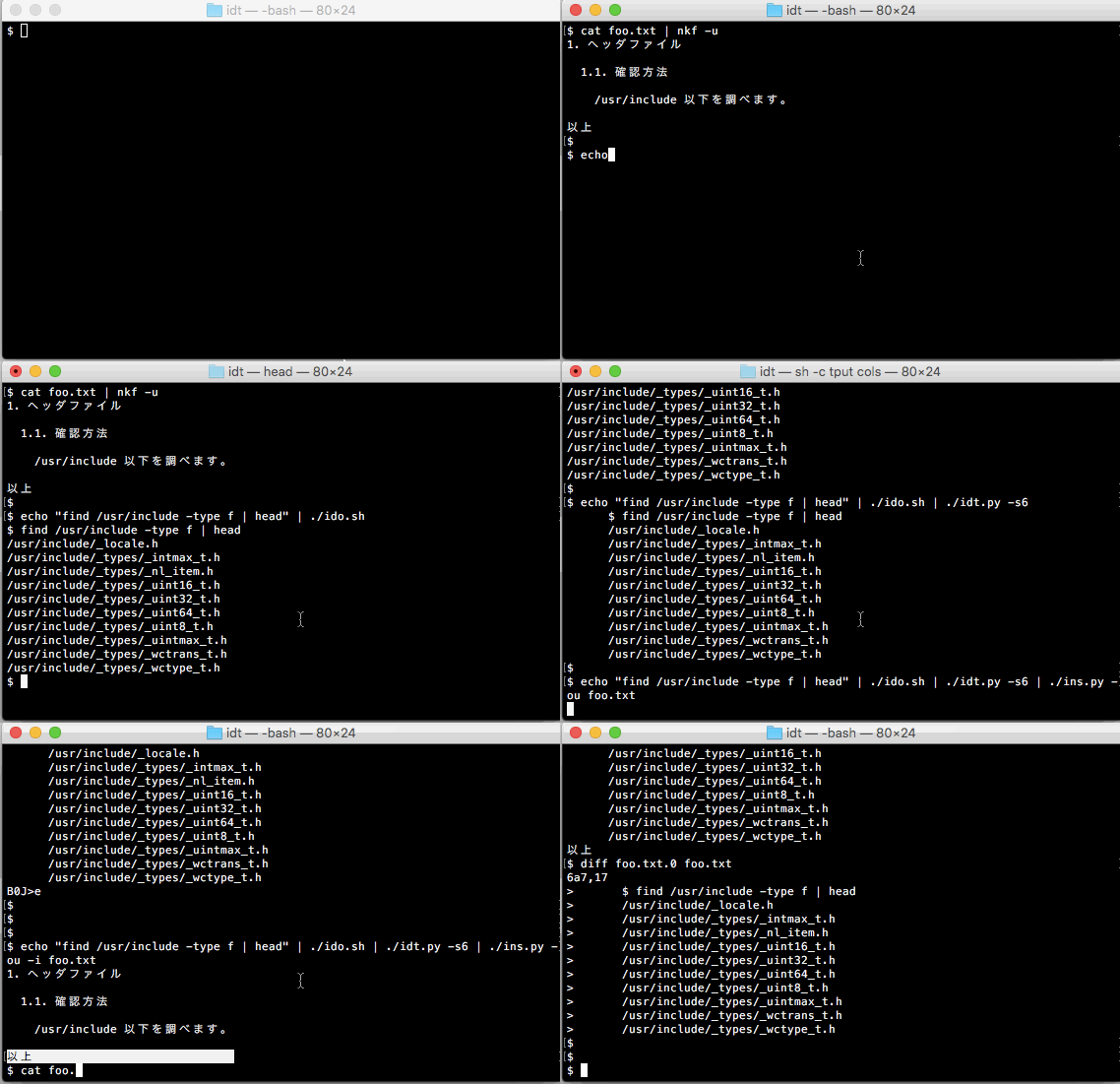
貼付ツール ins.py を追加してみました。
コマンドの実行結果を字下げツール idt.py で字下げしたあと、 テキストファイルの指定の位置に貼り付けるためのツールです。
例えば
$ cat foo.txt | nkf -g
ISO-2022-JP

$ cat foo.txt | nkf -u
1. ヘッダファイル

  1.1. 確認方法

    /usr/include 以下を調べます。

以上
$
なJISコードのテキストファイルがあったとして、 「以上」の行の前に、次の実行結果をスペース6つ字下げして貼り付けたいならば
$ echo "find /usr/include -type f | head" | ./ido.sh
$ find /usr/include -type f | head
/usr/include/autosprintf.h
/usr/include/monetary.h
/usr/include/math.h
/usr/include/ifaddrs.h
/usr/include/mntent.h
/usr/include/inttypes.h
/usr/include/dlfcn.h
/usr/include/rpc/xdr.h
/usr/include/rpc/pmap_prot.h
/usr/include/rpc/auth_unix.h
./idt.py -s6 で字下げして
$ echo "find /usr/include -type f | head" | ./ido.sh | ./idt.py -s6
      $ find /usr/include -type f | head
      /usr/include/autosprintf.h
      /usr/include/monetary.h
      /usr/include/math.h
      /usr/include/ifaddrs.h
      /usr/include/mntent.h
      /usr/include/inttypes.h
      /usr/include/dlfcn.h
      /usr/include/rpc/xdr.h
      /usr/include/rpc/pmap_prot.h
      /usr/include/rpc/auth_unix.h
./ins.py -i foo.txt で貼り付けます。
$ echo "find /usr/include -type f | head" | ./ido.sh | ./idt.py -s6 | ./ins.py -ou -i foo.txt
すると foo.txt の内容が表示されます。
カーソル位置の手前に挿入されるので、 「以上」の行が反転されるようにしてENTERキー入力です。
$ cat foo.txt | nkf -u
1. ヘッダファイル

  1.1. 確認方法

    /usr/include 以下を調べます。

      $ find /usr/include -type f | head
      /usr/include/autosprintf.h
      /usr/include/monetary.h
      /usr/include/math.h
      /usr/include/ifaddrs.h
      /usr/include/mntent.h
      /usr/include/inttypes.h
      /usr/include/dlfcn.h
      /usr/include/rpc/xdr.h
      /usr/include/rpc/pmap_prot.h
      /usr/include/rpc/auth_unix.h
以上
$
書き換える前のオリジナルのファイルは foo.txt.0 として残してます。
$ diff foo.txt.0 foo.txt
6a7,17
>       $ find /usr/include -type f | head
>       /usr/include/autosprintf.h
>       /usr/include/monetary.h
>       /usr/include/math.h
>       /usr/include/ifaddrs.h
>       /usr/include/mntent.h
>       /usr/include/inttypes.h
>       /usr/include/dlfcn.h
>       /usr/include/rpc/xdr.h
>       /usr/include/rpc/pmap_prot.h
>       /usr/include/rpc/auth_unix.h
$
カーソル行を移動した後、 やっぱり貼り付けせずに取り消したいときは、 「q」キーや「esc」キーで何もせずに終了します。
-h でヘルプ表示。
$ ./ins.py -h
Usage: ./ins.py [-o view_enc] [-s ins_str] [-i] fn_i
  if no -s xxx, use stdin
  fn_i == '-' use stdin (need -s xxx)
  -i : in place fn_i (over write)
貼る文字列を -s xxx で指定します。 指定が無ければ標準入力を使います。
貼り付けられる側のテキストファイルは、 ファイル名を指定します。
そのファイル名が'-'のときは標準入力を使います。 この場合、貼る文字列は -s xxx で指定します。
結果のテキストは標準出力に出します。
-i の指定(in place)があれば、標準出力には出さず、 貼り付けられる側のテキストファイルを上書きします。
上書きするときは、オリジナルのファイルを xxx.0 のファイル名で残します。 もし xxx.0 があれば xxx.1, 2, 3... と増えます。
貼り付け位置を決めるときの表示では、 端末のエンコーディング設定に併せて -o でエンコーディングを変更できます。
指定が無ければテキストファイルのエンコーディングのままで表示されます。
貼るテキストは、貼り付けられる側のテキストの漢字エンコーディングに変換されます。
$ cat bar.txt | nkf -g
EUC-JP

$ cat bar.txt | nkf -u
引用の例

  下記の例1の様に行頭に'> 'を追加します。

  例1
//
$
このEUCのテキスト bar.txt の'//'(の直前)に、 先のJISのテキスト foo.txt の各行頭に'> 'を付けて、さらにスペース2つ字下げして貼り付けるならば
$ cat foo.txt | nkf -g
ISO-2022-JP

$ cat foo.txt | ./idt.py -a'> ' -s2 | nkf -u
  > 1. ヘッダファイル
  >
  >   1.1. 確認方法
  >
  >     /usr/include 以下を調べます。
  >
  >       $ find /usr/include -type f | head
  >       /usr/include/autosprintf.h
  >       /usr/include/monetary.h
  >       /usr/include/math.h
  >       /usr/include/ifaddrs.h
  >       /usr/include/mntent.h
  >       /usr/include/inttypes.h
  >       /usr/include/dlfcn.h
  >       /usr/include/rpc/xdr.h
  >       /usr/include/rpc/pmap_prot.h
  >       /usr/include/rpc/auth_unix.h
  > 以上
なので
$ cat foo.txt | ./idt.py -a'> ' -s2 | ./ins.py -ou -i bar.txt
矢印キーでカーソルを「//」に合わせてENTERキー
$ cat bar.txt | nkf -g
EUC-JP
確かにEUCで
$ cat bar.txt | nkf -u
引用の例

  下記の例1の様に行頭に'> 'を追加します。

  例1
  > 1. ヘッダファイル
  >
  >   1.1. 確認方法
  >
  >     /usr/include 以下を調べます。
  >
  >       $ find /usr/include -type f | head
  >       /usr/include/autosprintf.h
  >       /usr/include/monetary.h
  >       /usr/include/math.h
  >       /usr/include/ifaddrs.h
  >       /usr/include/mntent.h
  >       /usr/include/inttypes.h
  >       /usr/include/dlfcn.h
  >       /usr/include/rpc/xdr.h
  >       /usr/include/rpc/pmap_prot.h
  >       /usr/include/rpc/auth_unix.h
  > 以上
//
-i をつけなければ標準出力にでます。
$ find /usr/include -type f | head > hoge.txt

$ cat hoge.txt
/usr/include/autosprintf.h
/usr/include/monetary.h
/usr/include/math.h
/usr/include/ifaddrs.h
/usr/include/mntent.h
/usr/include/inttypes.h
/usr/include/dlfcn.h
/usr/include/rpc/xdr.h
/usr/include/rpc/pmap_prot.h
/usr/include/rpc/auth_unix.h

$ echo '====================' | ./ins.py hoge.txt > fuga.txt
適当にカーソル移動してENTER
$ cat fuga.txt
/usr/include/autosprintf.h
/usr/include/monetary.h
/usr/include/math.h
/usr/include/ifaddrs.h
/usr/include/mntent.h
====================
/usr/include/inttypes.h
/usr/include/dlfcn.h
/usr/include/rpc/xdr.h
/usr/include/rpc/pmap_prot.h
/usr/include/rpc/auth_unix.h
-s で貼るテキストを指定するならば
$ ./ins.py -s '/////////////////' hoge.txt > guha.txt
適当にカーソル移動してENTER
$ cat guha.txt
/usr/include/autosprintf.h
/usr/include/monetary.h
/usr/include/math.h
/usr/include/ifaddrs.h
/usr/include/mntent.h
/////////////////
/usr/include/inttypes.h
/usr/include/dlfcn.h
/usr/include/rpc/xdr.h
/usr/include/rpc/pmap_prot.h
/usr/include/rpc/auth_unix.h
貼られる側を標準入力にするならば
$ cat hoge.txt | ./ins.py -s '|||||||||||||||||||' - > zaku.txt
適当にカーソル移動してENTER
$ cat zaku.txt
/usr/include/autosprintf.h
/usr/include/monetary.h
/usr/include/math.h
/usr/include/ifaddrs.h
/usr/include/mntent.h
|||||||||||||||||||
/usr/include/inttypes.h
/usr/include/dlfcn.h
/usr/include/rpc/xdr.h
/usr/include/rpc/pmap_prot.h
/usr/include/rpc/auth_unix.h
今回は盛りだくさんのなので、ソースファイルを細かく分けてみました。
$ (cd v3 ; wc -l *)
      10 dbg.py
      59 idt.py
      84 ins.py
      40 key.py
      26 newton.py
      74 nkf.py
      45 opt.py
      54 term.py
     104 view.py
     496 total
いづれも行数少なめです。
今回のins.pyは、標準入力、標準出力をパイプやリダイレクトで使いつつ、 キー入力を受け付けて、画面にも表示を出します。
その辺りのコツは term.py の /dev/tty 使用箇所や key.py に集約されてます。
忘れないうちにメモを書いておきます。
term.py
#!/usr/bin/env python

import subprocess as sp

tty_r = open('/dev/tty', 'r') # 端末からのキー入力用
tty_w = open('/dev/tty', 'w') # 端末への画面出力用

def get_sz(): # 端末のサイズを(w, h)で返します
        w = int( sp.check_output('tput cols', shell=True).strip() )
        h = int( sp.check_output('tput lines', shell=True).strip() )
        return (w, h)

def get_pos(): # 現在のカーソル位置を(x, y)で返します
        cmds = [
                #'echo -en "\e[6n"',
                'echo -en "\x1b[6n"',
                'read -sd"[" dmy',
                'read -sd"R" row_col',
                'echo -n $row_col >&2',
        ]
        cmd = "bash -c '{}'".format( '\n'.join(cmds) )

        proc = sp.Popen(cmd, shell=True, stdin=tty_r, stdout=tty_w, stderr=sp.PIPE)
        s = proc.communicate()[1].decode()
        proc.wait()

        (row, col) = map( int, s.split(';') )
        (x, y) = (col-1, row-1)
        return (x, y)

def stty(s, v=True): # sttyコマンドを実行します
        # stty('echo')        だと "stty echo < /dev/tty"
        # stty('echo', False) だと "stty -echo < /dev/tty"

        if not v:
                s = '-' + s
        cmd = 'stty {} < /dev/tty'.format(s)
        sp.call( cmd, shell=True )

def out(s): # 画面に文字列 s を出力
        tty_w.write(s)
        tty_w.flush()

esc = lambda s: chr(0x1b) + '[' + s # エスケープシーケンス用

loc = lambda x, y: out( esc( '{};{}H'.format(y+1, x+1) ) ) # カーソルを(x, y)に移動
rev = lambda : out( esc('7m') ) # 属性を反転表示に
uline = lambda : out( esc('4m') ) # 属性を下線ありに
reset = lambda : out( esc('0m') ) # 属性をリセットして戻す
cls = lambda : out( esc('2J') ) # 画面クリア

def scroll(m): # 画面をm行スクロール(mが負なら逆方向にスクロール)
        am = abs(m)
        sm = m / am
        v = 'S' if sm > 0 else 'T'
        out( esc( '{}{}'.format( am, v ) ) )
# EOF
key.py
#!/usr/bin/env python

import os
import term

esc = term.esc # エスケープシーケンス用
ctl = lambda s: chr( 1 + ord(s) - ord('a') ) # コントロールキー用

def init(): # 初期化処理
        term.stty('echo', False) # エコー表示なし
        term.stty('icanon', False) # 改行入力なしで反映

def fini(): # 終了処理
        term.stty('icanon', True) # 改行入力で反映
        term.stty('echo', True) # エコー表示あり

def get(): # 入力キー取得
        s = os.read( term.tty_r.fileno(), 10 ) # とりあえず上限は10文字分のシーケンスまで
        if type(s) != str: # python3 で bytes で返った場合
                s =''.join( map(chr, s) ) # strに変換
                                          # 単に decode() にすると
                                          # Alt+v で返る 0xf6 の場合などではエラーになる
        return s

def allow(k): # get()で取得したキーkが矢印キーなどの方向用のものならば
              # 上下左右を表す'u','d','l','r'の文字列を返す
              # 'pu','pd' はページアップ、ページダウン
              # 登録してる方向用のもの以外なら空文字列''を返す
        tbls = [[
                [ 'u', 'd', 'l', 'r' ],
                [ esc('A'), esc('B'), esc('D'), esc('C') ], # allow
                [ ctl('p'), ctl('n'), ctl('b'), ctl('f') ], # emacs
                [ 'k', 'j', 'h', 'l' ], # vi
        ],[
                [ 'pu', 'pd' ],
                [ esc('5~'), esc('6~') ], # allow
                [ chr(0xf6), ctl('v') ], # emacs
                [ 'b', ' ' ], # less
        ]]
        for tbl in tbls:
                for lst in tbl[1:]:
                        if k in lst:
                                return tbl[0][ lst.index(k) ]
        return ''
# EOF
nkf.py
#!/usr/bin/env python

import sys
import six
import subprocess as sp

enc = lambda s: s.encode('utf-8') if six.PY2 else s.encode() # unicode文字列sをutf-8にエンコード
dec = lambda b: unicode(b, 'utf-8') if six.PY2 else b.decode() # utf-8をunicode文字列にデコード

def do_cmd(cmd, in_b): # 標準入力にバイト列 in_b を与えてcmdを実行
                       # 結果の標準出力のバイト列を返す
        cmd = enc(cmd)
        proc = sp.Popen(cmd, shell=True, stdin=sp.PIPE, stdout=sp.PIPE)
        return proc.communicate(in_b)[0]

def get_stdin(): # 標準入力から読み出したバイト列を返す
        fi = sys.stdin if six.PY2 else sys.stdin.buffer
        return fi.read() # b

def put_stdout(b): # 標準出力にバイト列 b を書き込む
        fo = sys.stdout if six.PY2 else sys.stdout.buffer
        fo.write(b)

opt_dic = { # nkf -g が返す判定結果の表示と、対応するオプション指定の辞書
        'ISO-2022-JP': '-j',
        'EUC-JP': '-e',
        'Shift_JIS': '-s',
        'UTF-8': '-u',
        'ASCII': '',
}

def guess(b, style_opt=False): # バイト列 b を判定したエンコーディングを返す
                               # style_opt=True なら上記 opt_dic辞書の値の方の形式で返す
        b = do_cmd('nkf -g', b)
        opt = dec(b).strip()
        return opt_dic.get(opt, '-u') if style_opt else opt

def cvt(b, opt, do_guess=False): # バイト列 b を optで指定したエンコーディングに変換する
                                 # do_guess=Trueなら、b の現在のエンコーディングも調べて、なるべく無駄なコマンド実行を避ける
                                 # ("nkf -g" というコマンド実行は増えるけどね)
        if opt not in opt_dic.values():
                opt = opt_dic.get(opt, '-u')
        if opt == '':
                return b
        if do_guess:
                from_opt = guess(b, True)
                if from_opt == '' or from_opt == opt:
                        return b
        return do_cmd('nkf ' + opt, b)

def to_utf8(b): # バイト列 b を utf-8 に
        opt = guess(b, True)
        u8 = b if opt in ('-u', '') else cvt(b, '-u')
        return (u8, opt)

def utf8_to(u8, opt): # utf-8 を optで指定したエンコーディングのバイト列に
        return u8 if opt in ('-u', '') else cvt(u8, opt)

def to_str(b): # バイト列 b を unicode文字列に
        (u8, opt) = to_utf8(b)
        return ( dec(u8), opt )

def str_to(s, opt): # unicode文字列sを、optで指定したエンコーでイングのバイト列に
        return utf8_to( enc(s), opt )

def str_width(s): # unicode文字列sを端末に表示したときの、半角英数文字相当の文字数幅を返す
        return sum( map( lambda c: 1 if ord(c) < 0x80 else 2, s ) )

if __name__ == "__main__":
        b = get_stdin()
        opt = guess(b)
        u8 = cvt(b, '-u')
        s = dec(u8)
        # ...
        u8 = enc(s)
        b = cvt(u8, opt)
        put_stdout(b)
# EOF
opt.py
#!/usr/bin/env python

import sys

def get(k, def_val=None): # 文字列 k で始まるオプションの値を返す
                          # get('-foo', 0) の場合
                          #   'cmd -foo 3 bar' なら整数3
                          #   'cmd -foo4 bar' なら整数4
                          #   'cmd bar' なら整数0
                          # get('-foo') の場合
                          #   'cmd -foo 3 bar' なら文字列'3'
                          #   'cmd -foo4 bar' なら文字列'4'
                          #   'cmd bar' ならNone
        n = len(k)
        argv = sys.argv[1:]
        typ = type(def_val)
        for i in range( len(argv) ):
                s = argv[i]
                if s[:n] == k:
                        next = lambda : argv[i+1] if argv[i+1:] else ''
                        v = s[n:] if s[n:] else next()
                        return typ(v) if def_val != None and type(v) != typ else v
        return def_val

def not_opt_argv(ks_v, ks_0): # オプション指定以外のコマンド引数のリストを返す
        # ks_v : key list , key value or keyValue
        # ks_0 : key list , key (only)

        # ks_v には、値をともなうオプションのキーのリストを
        # ks_0 には、値をともなわないオプションのキーのリストを指定する

        argv = sys.argv[1:]
        argv = list( filter( lambda a: a not in ks_0, argv ) )

        def f(a):
                for k in ks_v:
                        if ( lambda n: a[:n] == k and a[n:] )( len(k) ):
                                return False
                return True
        argv = list( filter( f, argv ) )

        for k in ks_v:
                while k in argv:
                        i = argv.index(k)
                        argv = argv[:i] + argv[i+2:]
        return argv

def index(k): # 文字列 k で始まるオプションのコマンド引数のインデックスを返す
              # オプション k の指定がなければ -1 を返す
              # 先頭の実行コマンド文字列は除外して考える
        n = len(k)
        argv = sys.argv[1:]
        for i in range( len(argv) ):
                s = argv[i]
                if s[:n] == k:
                        return i
        return -1
# EOF
dbg.py
#!/usr/bin/env python

# あらかじめ別の端末で
# $ mkfifo /tmp/fifo
# $ cat /tmp/fifo
# を実行して待機させておく

import sys

fifo = open('/tmp/fifo', 'w') # あらかじめ作成しておいた /tmp/fifo をオープン

def out(s): # /tmp/fifo に文字列sを書き込んでフラッシュする
            # cat /tmp/fifo してる端末に文字列が表示される
        fifo.write(s + '\n')
        fifo.flush()
# EOF
newton.py
#!/usr/bin/env python

def get_int(f, l, r): # 整数用の簡易ニュートン法

        # f は1つの整数を引数として、整数か少数の値を返す関数
        # l, rは関数の定義域
        # というかf(x) = 0のxが存在するであろう範囲の上限と下限(逆でもOK)

        # f(x) = 0 となるxを求めて返す
        # f(x) = 0 にならない場合は、なるべく0に近くなるxを返す

        c = int( (l + r) / 2 )
        if l == r:
                return c

        (vl, vr) = ( f(l), f(r) )
        if vl * vr == 0:
                return c if vl + vr == 0 else ( l if vl == 0 else r )
        if vl * vr > 0:
                return c

        while abs(l - r) > 1:
                c = int( (l + r) / 2 )
                vc = f(c)
                if vc == 0:
                        return c
                if vc * vl > 0:
                        (l, vl) = (c, vc)
                else:
                        (r, vr) = (c, vc)

        (al, ar) = ( abs(vl), abs(vr) )
        return min(l, r) if al == ar else ( l if al < ar else r )
# EOF